Can You Trust What AI Tells You About Your Pricing? Five Questions to Ask the Tool Itself
Thibault Masson
10/19/2026
Sponsored by PriceLabs
Most vacation rental management companies have by now used an AI chatbot—meaning a tool like ChatGPT, Claude, or Gemini that you type a question into—to write a listing description or to make sense of a spreadsheet.
A growing number have gone a step further and linked it to their pricing tool so that it reads their bookings and rates directly. At PriceLabs, where we build pricing and revenue management software for vacation rentals, we opened that door ourselves in July. Meanwhile, many software products have added a chat box of their own, often presented as an “AI assistant.”
So, the answers are no longer the problem, since they come fast and they are fluent, confident, and often quite sensible. The question we hear most from vacation rental managers is no longer “can AI help with my pricing?” but “can I trust what it tells me?”, and we think it is the right question.
Here’s the thing: An AI answer about your pricing is rarely wrong in an obvious way, and much more often it is correct in general and wrong for you. The tool tells you to drop the four-night minimum on a lake house because it is costing you occupancy, which is true, except that you hold that minimum on purpose because the homeowner does not want guests and a cleaning crew coming through every two days. Or it suggests lowering rates in March to fill the calendar, when your goal for the quarter is to raise ADR (average daily rate) because occupancy is already ahead of plan. A good revenue analyst on your team would never make either suggestion, and not because they are smarter, but because they know things about your business that are not in the numbers.
Where Trust in an Answer Really Comes From
An answer you can trust needs three things: knowledge of your business, revenue management expertise, and safeguards that leave the final decision with you. A chatbot usually does not come with all three, and this is true of the two kinds you are likely to meet: your own ChatGPT or Claude linked to your account, and the chat box built into a software product.
To be fair, these tools have moved fast. ChatGPT and Claude can now remember things from one conversation to the next, read your real numbers once they are linked to your pricing software, and even repeat the same request automatically every week. But giving an AI access to your data is not the same as giving it judgment. What it remembers is usually whatever happened to come up in past conversations, which is not a properly kept record of your business, and it generally does not know what to look for unless you tell it, so in practice you remain the analyst. The chat box inside a software product starts with an advantage, since it already sees your data, but it shares the main limitation: it answers when it is asked, and then it waits.
An AI revenue analyst, meaning software built to do the work of the analyst on your team, is the opposite design, since it works in the background, every day and every week, and comes to you only when something needs a decision. What makes it more trustworthy is not that it is always on, but the context that comes with working that way. A chatbot mostly knows what is in the conversation in front of it, while an analyst that lives inside your pricing software can keep what you told it matters most, your goals, your notes on each listing, every check it has run, and every decision you have made, and read each new result against all of it.
It also covers the questions nobody thought to ask, which is where revenue tends to slip away. Think of the listing that travelers still look at but stopped booking three weeks ago, or the holiday week that was fully booked four months ahead at last year’s rates, which looks like good news in every report when it really means the week was sold too cheaply. The same goes for opportunities, such as a newly announced concert on a weekend you have not looked at yet. With 300 homes, let alone 3,000 across several markets, no revenue team can look at every listing every week, and you cannot trust an answer to a question that was never asked.
Five Questions to Ask the Tool, Not the Salesperson
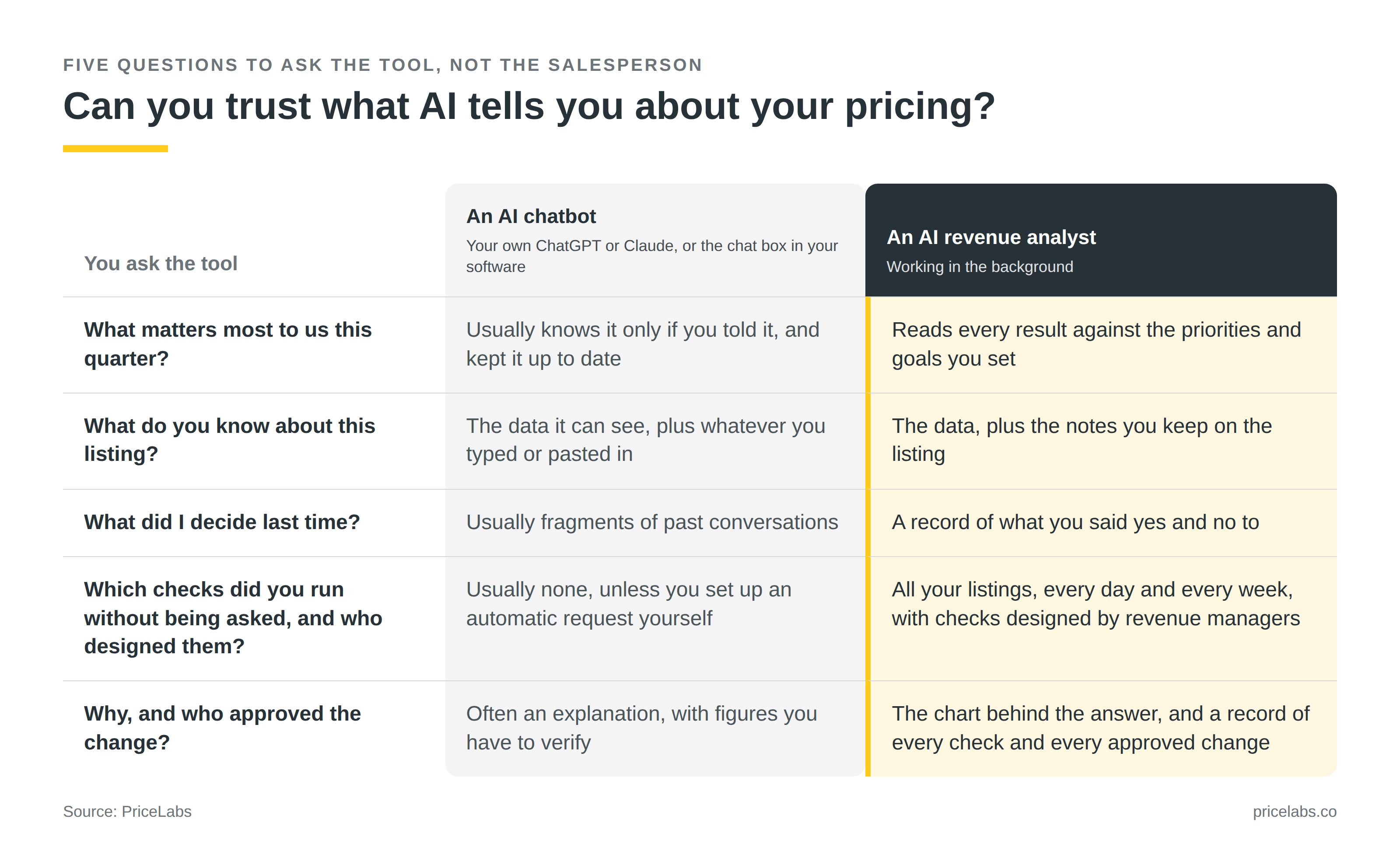
You do not need to sit through a sales call to find out which kind of tool you have. Open whatever AI tool you use today to look at your listings, ask it for a pricing recommendation on one of them, and then type these in (or keep the list for the first demo you are shown). Some tools will tell you honestly that they do not know, and others will produce a confident answer anyway, so judge each reply on whether it is specific to your business and whether you can check it. The first three test what the tool knows about your business, the fourth tests the expertise behind it and whether it works without you, and the fifth tests whether you stay in control. For each one, the standard is what you would expect from a good human analyst on your team.
- “What matters most to my company this quarter, and how does your recommendation serve it?” If the reply is a general speech about balancing occupancy and rate, the tool does not know your priorities or your goals (a revenue budget for the year, a target per market, or what you projected to a homeowner when you signed them), and every recommendation it gives you is aimed at an average business. A good AI revenue analyst answers the way someone who sat in your budget meeting would, by naming the goal and saying how the suggestion moves you toward it.
- “What do you know about this listing that is not in the numbers?” The homeowner who blocks two weeks in August, the construction next door, the minimum stay you hold on purpose: in most companies, these live in a revenue manager’s head, and they leave when that person leaves. A good AI revenue analyst works the way a new colleague would: it reads the notes your team has left on each listing in your revenue management system, whether they are about the homeowner or about why a decision was made, before it suggests anything. A tool that cannot read them will tend to flag your decisions as mistakes.
- “What did I decide the last time you raised this?” A chatbot may recall fragments of an earlier conversation, which is different from a record of what was proposed, accepted, and refused. Without that record, the tool is likely to bring back the suggestion you already turned down, and you will stop reading it within a month. A good AI revenue analyst remembers that you said no and why and only raises the point again if something has changed.
- “Which checks have you run on my listings since yesterday without being asked, who designed them, and which will you run again next Monday?” This is the question that separates a chatbot from an analyst working in the background. Unless you have set up an automatic request yourself and kept it running, a chatbot’s honest answer is usually “none.” The review you want every Monday should arrive because you asked for it once, and its checks should be the ones an experienced revenue manager would run, not the ones you happened to think of.
- “Why? Show me where that comes from, and show me what was changed and who approved it.” A trustworthy answer takes you to the chart behind it, with your current numbers and not a report you pasted three weeks ago or a figure the tool has simply made up, which AI tools still do from time to time. If the tool can change rates, there should also be a record of every change with the name of the person who said yes, so that you can answer a homeowner asking why their rates dropped.
If you prefer to see it side by side:
What to Do with the Result
If your tool fails the first two questions, the fix starts on your side and costs nothing. Write down your revenue goals for the year and for each quarter, by market if you operate in several, and keep a short note on every listing with what the numbers cannot show, somewhere a tool or a new hire can read them. It is good revenue management practice with or without AI, and it is the only way any analyst, human or not, can give you an answer that fits your business.
Trusting the answers does not mean handing over the keys, by the way, so it is worth agreeing internally who approves what, as you would for any new analyst. Watch the volume as well, because a tool that sends you thirty alerts a day has given you a new job rather than taken one away.
So, Chatbot or Revenue Analyst?
You will probably keep using both, and we build for both at PriceLabs: a chatbot for the question of the moment, where you bring the judgment and you check the answer, and an AI revenue analyst for the work that has to happen whether or not anybody thinks of it. What we would avoid is acting on an answer because it sounded right.
Full disclosure, since we sell software ourselves: These five questions are the ones we have been putting to our own product. Athena, the AI revenue analyst now available in beta (early access) inside PriceLabs, was built to pass them. It works in the background, runs daily and weekly checks designed by our revenue management experts, and reads the results against what you said matters most: your revenue goals and your listing notes.
Athena brings you only the few things that need a decision (approve, ask why, or reject), and keeps a record of every check that was ran and every change that was made, so nothing moves without your yes. Please test it as hard as you would any other tool. The five questions take about ten minutes to type, at your desk tonight or in front of any software demo, ours included.
Thibault Masson
Thibault Masson is the head of product marketing at PriceLabs.